


Smart Labels
4.8212.00 Reviews
App Specs
- Version
- 15.1.1
- Updated On
- License
- Free
- Downloads
- 10,000+
- Developer
- QR Smart Labels
- Categories
- House & Home
- Platform
- Android
Screenshots
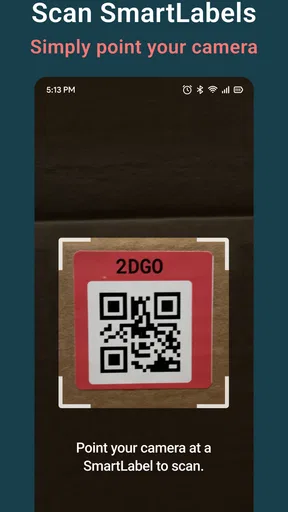
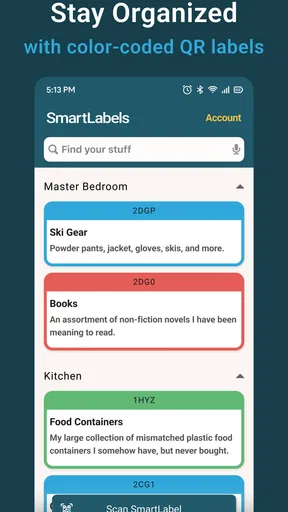
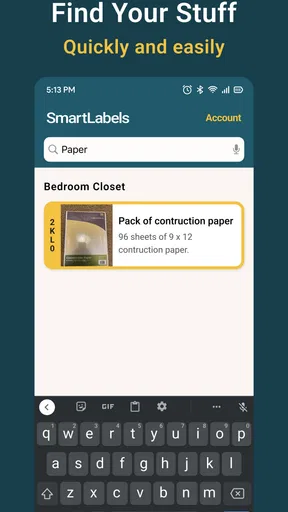
 Analysis by AppCompare
If you're anything like me, you're always on the lookout for ways to simplify your life, especially when it comes to organizing. That's where Smart Labels, the app that's been buzzing around in productivity circles, comes into play. I've been diving deep into it, and let me tell you, it's packed with features that make managing labels a breeze.
Getting Started with Smart Labels
First things first, downloading and installing Smart Labels is a cinch. Available on both Android and iOS, it takes just a couple of taps to get started. Once you open it up, you're greeted with a clean and intuitive interface. The design is sleek, which makes navigating through the app a hassle-free experience. You're immediately prompted to create your first label, and that's where the fun begins.
Features That Stand Out
The app offers a plethora of features that cater to both personal and professional needs. You can create labels for just about anything—be it for your pantry items, office files, or even digital folders. The real magic happens with its customization options. You can choose from a range of colors, fonts, and even add icons to your labels. This makes it super easy to find exactly what you're looking for at a glance.
One of the standout features is the app's ability to integrate with your existing tools. Whether you're using Google Drive, Dropbox, or even simple spreadsheets, Smart Labels has got you covered. The integration is seamless, allowing you to import and export data without any hiccups.
Why You'll Love It
Now, why should you consider using Smart Labels over other labeling apps? For starters, the app's ability to work offline is a game-changer. This means you can access and manage your labels even when you're not connected to the internet. Perfect for those moments when you're in a pinch and need to find something quickly.
Moreover, the app's smart search feature is incredibly efficient. It uses keywords and tags to help you locate labels faster than ever. No more scrolling endlessly through lists to find what you need. Just type in a keyword, and there it is.
Room for Improvement?
As much as I love Smart Labels, it's not without its minor quirks. There were a few times when the app froze momentarily, especially when handling large data imports. It's not a deal-breaker, but something to keep in mind if you're planning to use it for extensive projects.
Worth Reading Before You Choose

Flipboard Shows What News Apps Must Do Beyond the Feed

Switching to Android Auto Means Rethinking Your Driving Routine

Google Calendar Makes a Crowded Week Easier to Manage

Ludo King Makes the Most of the Minutes Between Plans

Baby Panda World Brings Quick Play to Modern Phones, but Its Game Library Feels Busy

ESPN’s Live Game View Makes Following Close Games Easier
Additionally, while the app does offer a free version, some of its more advanced features are locked behind a premium subscription. Depending on your needs, this might be a worthwhile investment, but it's always nice to have more options available in the free version.
Final Thoughts
Overall, Smart Labels is a fantastic tool for anyone looking to streamline their labeling process. Its ease of use, coupled with powerful features, makes it a must-have app for organizing enthusiasts. Whether you're managing your home pantry or keeping track of important documents, Smart Labels has something to offer. Give it a try, and you might just find it becoming an integral part of your daily routine.
Ready to dive into the world of organized bliss? You can download Smart Labels from the App Store or Google Play and start labeling your way to a more organized life.
Pros
- User-friendly interface for easy navigation.
- Customizable label templates for personalization.
- Integration with cloud storage for backup.
- Barcode scanning feature enhances usability.
- Supports multiple languages for global use.
Cons
- Limited free features; premium needed for more.
- Occasional bugs in the printing process.
- Requires internet for full functionality.
- High battery consumption during use.
- Ads can be intrusive in the free version.
FAQs for Smart Labels
What is Smart Labels and how does it work?
Smart Labels is an innovative app designed to help users organize and manage their tasks, notes, and reminders efficiently. By utilizing smart tagging and categorization features, the app allows users to label their tasks with keywords, making it easy to sort and access information quickly. The intuitive interface ensures a seamless user experience.
Is Smart Labels available for both Android and iOS devices?
Yes, Smart Labels is available on both Android and iOS platforms. Users can download it from the Google Play Store or the Apple App Store, ensuring compatibility with a wide range of smartphones and tablets. It provides consistent functionality and updates across both operating systems.
What are the main features of Smart Labels?
Smart Labels offers a variety of features designed to streamline task management. These include customizable labels, color-coded organization, deadline reminders, and integration with calendar apps. The app also supports cloud synchronization, allowing users to access their data from any device seamlessly. These features make it a comprehensive productivity tool.
Is there a subscription fee for using Smart Labels?
Smart Labels offers both a free version and a premium subscription. The free version includes basic functionalities, while the premium version unlocks advanced features such as additional label customization options and enhanced cloud storage. Pricing for the subscription is competitive, with monthly and yearly options available.
How secure is my data with Smart Labels?
Data security is a top priority for Smart Labels. The app uses encryption to protect user data and ensures secure cloud storage. Regular updates and security audits are conducted to safeguard against vulnerabilities. Users can feel confident that their information is kept private and secure with Smart Labels.


